
Download Cut Machine Fonts Design Space – Font Library, Monogram Tool, Cricut Compatible
Overview
Cut Machine Fonts Design Space is a desktop application tailored for designers, crafters, and hobbyists who rely on Cricut machines for their creative projects. The software provides access to over 1000 fonts and a diverse selection of monograms, making it a go-to tool for personal and commercial design work. Its primary purpose is to streamline the font selection and integration process for users working within the Design Space ecosystem.
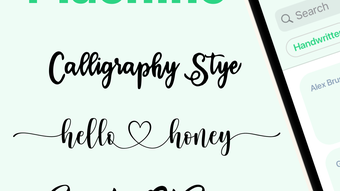
Whether creating intricate cursive designs, bold vintage lettering, or modern minimalist text, the app supports a wide range of aesthetic styles. It is especially useful for individuals preparing projects for cutting, engraving, or vinyl application using compatible Cricut devices such as Joy, Explore/Explore 3, and Maker/Maker 3. The app is designed to enhance workflow efficiency by offering a centralized library of fonts that are already optimized for Cricut machines.
While the developer did not provide additional background information, the app’s functionality suggests a focus on accessibility and usability for non-professional creatives. Real-world usage scenarios include crafting personalized gifts, customizing apparel, designing signage, and preparing materials for school or community events. The app supports both personal and commercial use under an open license, which broadens its appeal to small business owners and independent artists.
Key Features & Capabilities
- Extensive Font Library – Over 1000 fonts are available, covering multiple styles including cursive, script, serif, sans-serif, vintage, and modern. This diversity allows users to find the perfect match for any project theme or mood.
- Monogram Collection – A curated selection of monograms supports personalized design work, ideal for weddings, branding, or custom gifts.
- Real-Time Preview – Users can enter specific text to instantly preview how it will appear in selected fonts, helping with visual decision-making before finalizing designs.
- Filter-Based Search – Advanced filtering options allow users to narrow down fonts by style, category, or usage type, improving search accuracy and speed.
- Cricut Compatibility – All fonts and monograms are fully compatible with major Cricut machines and integrated into Design Space, ensuring seamless workflow from selection to cutting.
- Open License for Use – The app grants personal and commercial use rights, enabling unrestricted application of downloaded content in various projects.
- Easy Import Functionality – Intuitive instructions guide users through the font import process, minimizing technical barriers for beginners.
These features collectively reduce the time spent searching for suitable fonts and eliminate compatibility issues. For example, a user creating a custom wedding invitation can quickly browse through script fonts, preview the couple’s names in multiple styles, and export the design directly to their Cricut machine. Similarly, a small business owner designing branded merchandise can use the monogram tools to create a consistent visual identity across products. The integration with Design Space ensures that users do not need to manually convert file formats or adjust settings for machine compatibility.
User Interface, Workflow & Performance
The user interface of Cut Machine Fonts Design Space is described as user-friendly, emphasizing intuitive navigation and visual clarity. The layout appears structured around a central search bar and filter panel, enabling users to efficiently locate desired fonts. The workflow is designed to be linear and predictable: select a font → preview text → import → use in Design Space.
This streamlined process minimizes friction during creative sessions. While the developer did not specify resource usage details, general software behavior patterns suggest moderate CPU and RAM consumption typical of desktop applications with visual previews. Stability is implied through the seamless integration with Cricut’s Design Space, indicating consistent performance during active design tasks.
The app does not report any known crashes or freezes based on publicly available information. Performance observations are based on general software behavior patterns. Users can expect responsive interaction when searching and previewing fonts, though actual speed may vary depending on system configuration and the number of fonts loaded.
The application is designed to operate without requiring advanced technical knowledge, making it accessible to users across skill levels.
Compatibility & System Requirements
Cut Machine Fonts Design Space is available for both Windows and Mac operating systems. The software has a download size of 100MB, which suggests a lightweight installation. The latest version was released on 2024-04-28, indicating regular updates and ongoing development.
The app is specifically designed to work with Cricut machines including Joy, Explore/Explore 3, and Maker/Maker 3, and is fully supported within the Design Space platform. The developer did not specify exact system requirements, so users should ensure their device meets the minimum standards expected for running desktop applications and graphic tools. Compatibility information was partially provided.
It is recommended to verify system specifications against those of similar design software before installation. No additional hardware dependencies beyond standard input devices are known to be required.
Pros and Cons
Pros
- Over 1000 fonts and monograms available for diverse design needs
- Real-time text preview enhances visual decision-making
- Optimized for Cricut machines and Design Space integration
- Open license allows personal and commercial use
- Intuitive interface suitable for beginners and experienced users
- Free access to a large portion of features
Cons
- Full feature set requires a PRO subscription at $29.99 per year
- Exact system requirements were not listed
- Performance details not publicly disclosed
- Third-party app not affiliated with Cricut Inc.
- Limited information on update frequency beyond the release date
FAQ Section
Is Cut Machine Fonts Design Space compatible with all Cricut machines?
Yes, the app is compatible with Joy, Explore/Explore 3, and Maker/Maker 3 models, and is fully supported within Design Space.
Can I use the fonts for commercial projects?
Yes, all fonts and monograms are licensed for both personal and commercial use.
Is the software free to download and use?
Yes, the app offers a large percentage of its features for free. A PRO version is available for $29.99 per year with additional premium features.
What operating systems does it support?
Cut Machine Fonts Design Space is available for Windows and Mac platforms.
Do I need an internet connection to use the app?
The app requires an internet connection for initial download and access to the font library. Offline usage may be limited depending on the version and feature set.
Final Thoughts + CTA
Cut Machine Fonts Design Space stands out as a practical and accessible tool for anyone using Cricut machines for creative projects. Its extensive library, real-time preview, and seamless integration with Design Space make it a valuable asset for crafters, small business owners, and designers. The open license for personal and commercial use adds significant flexibility, while the free tier ensures broad accessibility.
Although the full feature set is locked behind a subscription, the free version remains robust for most users. The app’s lightweight design and cross-platform availability further enhance its appeal. For those seeking a reliable, Cricut-optimized font solution with minimal setup, this software delivers strong value.
Download Cut Machine Fonts Design Space now and elevate your crafting experience with professional-grade typography.







